
How to Add Music to CapCut: Step-by-Step Guide
Adding music to a video can bring it to life and make it more memorable. With CapCut’s editing tools, you can combine music with your footage to create more engaging content. Users often struggle in creating their content into the desired ones, and adding music could be the best solution for them. If you are one of those looking for the process of adding music to your content, then this article will assist you in the best possible way. Choose the right music that could change the viewer’s mood and make the video engaging. Let’s discover how to add music to Capcut!
Step by Step Guide on How to Add Music to CapCut
Adding music in a Capcut is simple, it can make your video interesting.. Just read the steps below and follow them one by one:
Open the Capcut
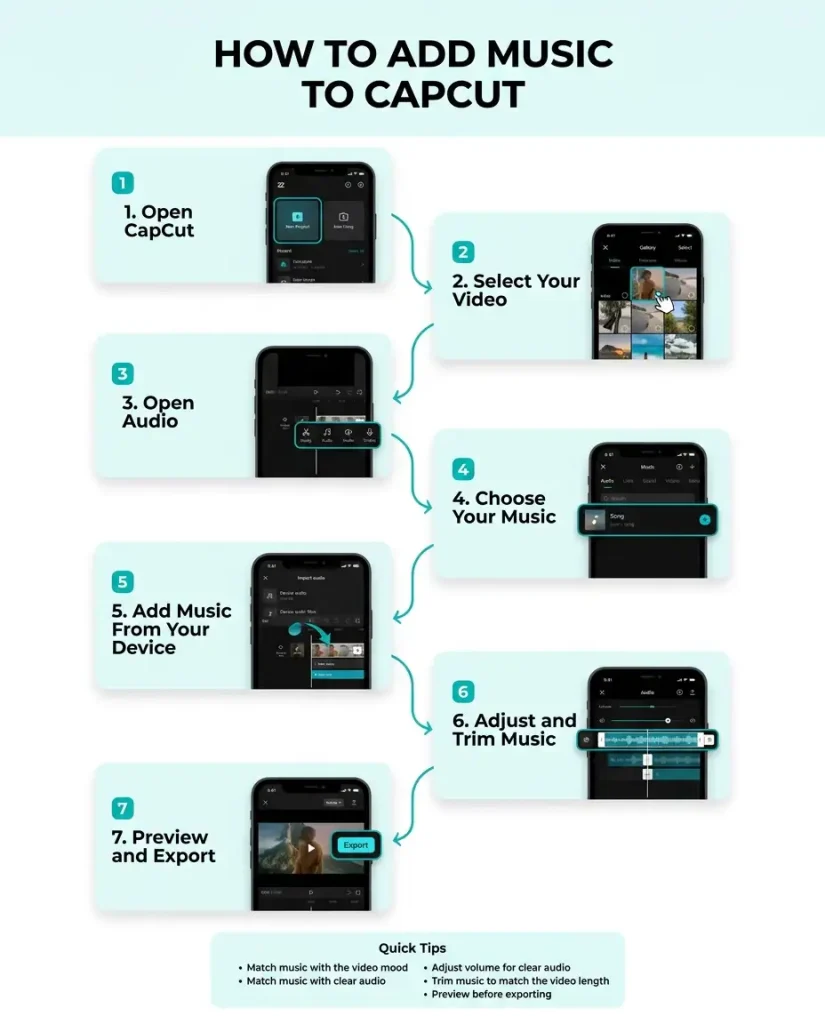
The first step is to open CapCut. On the opening screen, tap “New Project” to begin editing, then select the video from your gallery that you want to add music to. The steps are similar across devices, although the interface may vary slightly when using CapCut on iOS. Once you select “Add”, the video will appear on the editing timeline.
Check for Audio Option
Now, the second step is to click on the video that appears on the timeline and check the toolbar which appears at the bottom of the screen. Find the “Audio” option in the editing options which contains different elements like Adding music, sounds and other audio elements to the video.
Choose the Music
Once you tap the audio,select the music that you want to add. You can also select from the music library available in the capcut or search for any particular music by writing its name in the search bar. Choose music that best suits your video.
Apply Music From Built In Library
Once you find the suitable song for your video, click on “+” or add an option which mainly appears next to the music track. The music will appear underneath your video next on the timeline. You can now easily edit the music and add it to the sections in which you want to add. You can also adjust its speed.
Add Music From your Gallery
if you want to add music from your device then click on “Sounds” which appears in the audio section. In that option search for the option “from device” and tap on it. It will direct you to your music gallery. Select the audio file from your device files and click on “add”. The music will appear on your timeline. If you are looking for music to use in your videos, the YouTube Audio Library offers production music and sound effects with usage information, making it a useful source when choosing audio for your project.
Adjust the Music Volume and Position
You can move the audio track to the point where you want it to begin, while also increasing or decreasing the music volume. For better synchronization, align the music with specific moments in your video, such as transitions or visual effects. For example, reversing a video in CapCut can create an interesting visual effect that works well when timed with a beat or musical change.
Trim the Music
if the music is longer than your video, you can easily trim it by dragging its edge. There is also a split feature that you can utilize to trim the unwanted section of the music.
These steps are mainly focused on the mobile editing workflow. If you prefer working on a larger screen, the CapCut PC version provides a desktop editing environment where you can arrange video clips and audio tracks more precisely on the timeline.
Preview the Video
After you have made the changes, click on play and preview your video. Check if all the changes like transitions, volume and timing are fine .
Export the Video
Once the video is finalized, click on Export, which is usually located at the top right corner of the screen. Before publishing the finished video, review the exported file to make sure everything looks correct and check for any unwanted branding. If a watermark appears, you can learn how to remove the CapCut watermark before sharing the video.

Why do we Need to Add Music to CapCut?
Adding music can make the user watch it again and again. Lets know why people add music to capcut:
To Make Content Engaging
Adding music can make your videos more engaging. A good and trendy music can compel the users to watch the video till last. In short, it can grab the user’s attention instantly.
To Focus on the Important Part
The important part in a video can often be more emphasized if the music is added. For example, you can add emotional music to a heart-touching part of the video. This can make the important parts of videos more memorable.
To Create a Mood
Music is the medicine of the soul, and adding it to the videos can communicate emotion without using words. Music can often create a video that is fun and exciting and create a peaceful feeling.
Final Verdict
This article has provided a complete set of guidance on how to add music to Capcut. It has shed light on its process that would let the user add the music and make the content entertaining. This aspect can change the vibe of the video and make it more engaging. The right choice of music can change the viewer’s mood too. So, if your videos feel a little unattractive, try adding songs that can make a big difference.
More From CapCtProAPK: Add-keyframe-in-capcut-pc
Frequently Asked Questions-FAQs
Is it possible to add my own music to a video?
Yes, you can add your own music to a video by importing it from your gallery to the CapCut.
Can I use multiple audio tracks in a single video?
Yes, you can add multiple song tracks in a single video.
How can I add music to one part of the video?
You can use the “split” feature to divide video into parts and trim the song to that video.